OSINT with Overpass Turbo
With everything going on these days, I’ve been looking for more and more distractions hobbies to keep me entertained. One of them has been digging into the world of “Open Source Intelligence”. From wikipedia:
Open source intelligence (OSINT) is the collection and analysis of data gathered from open sources (overt sources and publicly available information) to produce actionable intelligence.
One area that’s been particularly fascinating to me is “geospatial intelligence” (GEOINT). Basically: finding where a picture was taken. But how can you practice these skills? Well, for starters there’s GeoGuessr which is a ton of fun.
There are also a number of sites and social media accounts that put out OSINT challenges for people to try to solve. Once such site is bellingcat, an investigative journalism website that does all of it’s information gathering using OSINT. They know their stuff!
In this post, I’d like to walk through my solution to one of their challenges.
The Challenge
Under the “Puzzling Postcards” category, there is a challenge called “Shifting Focus”. We’re asked to find the street address of a gas station in a blurry photograph:

Photo Analysis
I’m still learning about OSINT investigations, but it seems like the best first step is simply to look at the photo. Make a list of all the identifiable features. They may be things we investigate further with specialized tools.
Here’s the things that stood out to me:
- In the foreground we have a gas station (more on this in a moment)
- There between the gas station and the bottom of the frame is a section of grass and a sidewalk
- The gas station has a somewhat unique roof
- Just past the gas station (and to the left) there appears to be a strip-mall of some sort
- There a couple of cars in the gas station (one license plate is blurry, but visible)
- In the background is a snowy mountain range (without trees)
- The sky is overcast and it appears to be dusk
Starting Assumptions
In an investigation, you have to make some assumptions to narrow the search field. That said, if you make some false assumptions, you might spend time going down the wrong path. It helps to identify what you know for sure and what is an unverified assumption.
My first assumption is that this is a Chevron gas station. The logo, while blurry, has the same general shape and colors. If I didn’t already know what that logo was, I would probably have googled “gas station logos [country]” and scan through the results until I found something that matched.
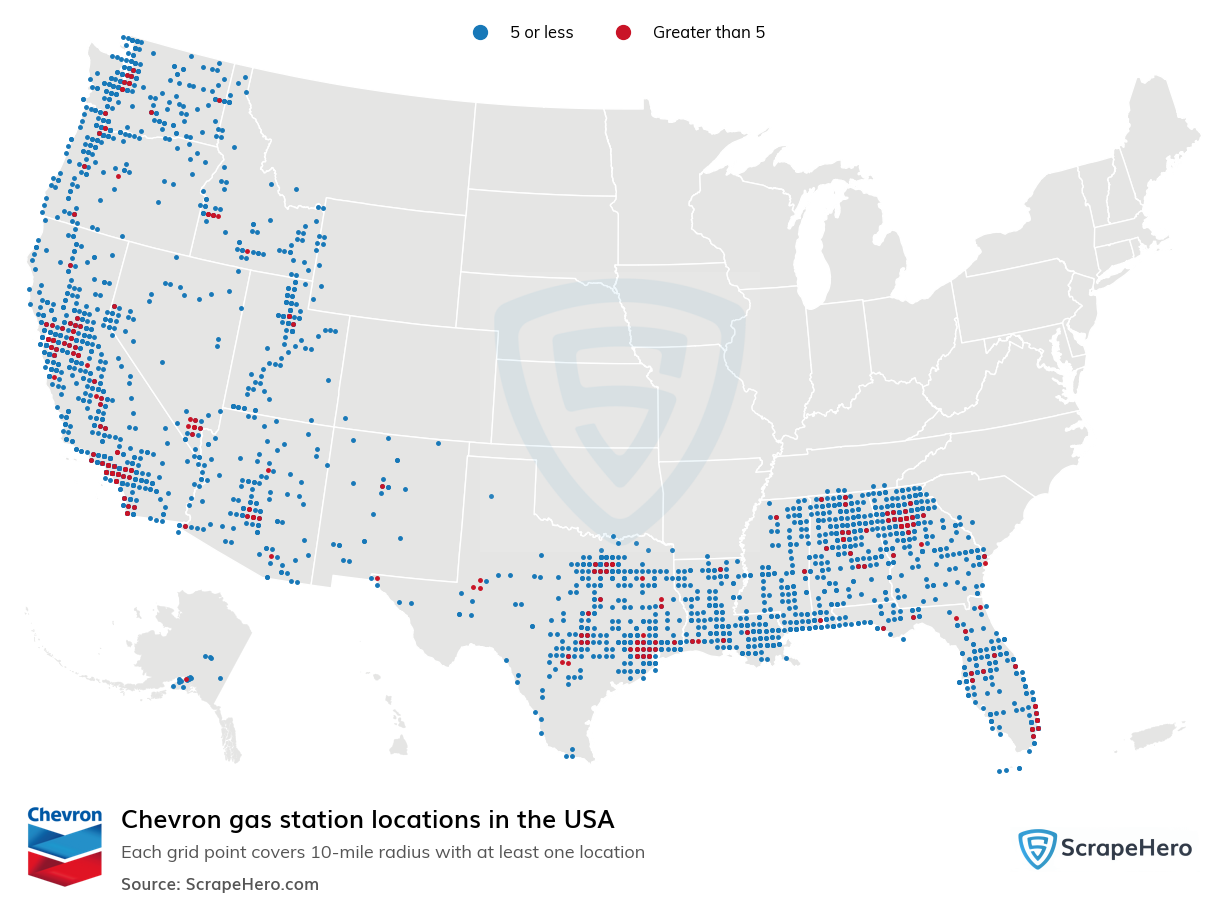
My second assumption is that we are looking at the United States. Chevron only services the US and Mexico, and these snowy mountains don’t really scream “Mexico” to me. This also just feels like the US to me. It’s hard to quantify, but sometimes you need to go with your gut.
Okay, so we’re looking for a Chevron in the United States, how hard could that be?
Educated Guesses
I’d like to make one more educated guess before pulling in tools: the mountain range. There are only a few major mountain ranges in the US. That means we can cut out all the locations that aren’t near those ranges (most of the southern states).
As an avid rock climber / mountaineer, I was pretty sure I knew the range the moment I opened the photo up. That said, there are tools specifically designed to help you identify mountain ranges (e.g. PeakVisor).
To me, this looks like the Wasatch Range in Utah (part of the Rocky Mountains). So we are looking for Chevron gas stations in relatively close proximity to the Wasatch Range in Utah.
And the gas station is likely on the east side of the road. How do I know that? Well most of the cities in Utah are west of the mountains (with Park City being an exception). Furthermore, this photo looks like dusk and if we were facing west we would probably see some light in the sky. It’s a guess, but this mountain range runs north/south so this is an educated 50/50 guess.
Overpass Turbo
At this point, there are about 30 results. We could go through each manually with the information we have and find our result, but I really wanted to mention overpass turbo. It’s a website that lets you visualize the treasure trove of information available via openstreetmaps and has it’s own query language that can be used to extract a ton of interesting information.
For example, when you first load it up the default query shows you the location of every drinking fountain in Rome. Here’s the query:
node
  [amenity=drinking_water]
  ({{bbox}});
out;
I won’t cover the syntax too much, but there are tutorials out there if you wish to learn more. The basic gist is that we’re getting all of the locations (node) for water fountains (using the tag search [amenity=drinking_water]).
Openstreetmaps uses “tags” to categorize and label everything. There are a lot of tags, so using this site helps to find what we’re looking for. Let me walk through how I used these tools to narrow the search field.
Refining Our Results
Okay, so let’s first move the map bounds over to Utah and just find all the Chevron gas stations:
[out:json][timeout:90][bbox:{{bbox}}];

node[amenity=fuel][brand=Chevron];

out center meta;
31 Results. We can refine this further.
At first I thought about looking for all the sidewalks… Unsurprisingly, this didn’t narrow the search field down enough. In fact, it actually filtered out the correct answer (likely due to incomplete sidewalk data in OpenStreetMap), but I’m including this as a lesson: not all filters will help, and some might accidentally exclude your target.
[out:json][timeout:90][bbox:{{bbox}}];

// Get all sidewalks
way[footway=sidewalk]->.sidewalks

// Find all Chevron stations near a sidewalk
node[amenity=fuel][brand=Chevron]
    (around.sidewalks:50);

out center meta;
As you can see, you can save results to variables (e.g. .sidewalks) and use those as filters. Like I said, the sidewalk query doesn’t really help us (in fact, it actually filters out the answer, but I had no way of knowing that at the time). What are some other things in the photo we can query against instead? How about that strip mall:
[out:json][timeout:90][bbox:{{bbox}}];

// Get all strip-malls
(
    way[landuse=retail];
    way[landuse=commercial];
)->.retail;

// Find all Chevron stations near strip malls
node[amenity=fuel][brand=Chevron]
    (around.retail:200);

out center meta;
As you can see, you can combine multiple queries (with parenthesis that works as an OR filter). This brings our search field down to less than 20. Perhaps the juice isn’t worth the squeeze in this case, but I hope it’s clear that this tool is incredibly valuable in these sorts of investigations.
Manual Work
No matter how much you narrow down results, there’s usually some amount of manual work at the end. Looking at the map on overpass turbo we can look over the 20-ish results and rule out any locations that aren’t on the east side of the road. That brings the results down to 3 or 4. From there, just first up Google Maps, drop in the coordinates, and hit-up street view. Once I got to this point, finding the exact gas station took me less than 5 minutes. If you’re following along, I’ll let you enter find it yourself (enter it on the bellingcat website for confirmation).
Recap
So here’s the overall process for geo-locating an image:
- Manual analysis
- Make some assumptions based on that analysis
- Make one or two educated guesses (if possible)
- Use tools to narrow the field
- Review a manageable list by hand
Throughout the process, always look for ways to confirm or disprove prior assumptions. Don’t go down a rabbit hole for too long. If you get stumped, take a step back. Maybe an initial assumption was wrong or perhaps there’s more in the image (or the context of the image) that you missed in step 1.
I hope this post was entertaining / informative. I’m not used to writing about this sort of thing, but I’d be more than happy to do more of these posts if there’s interest.